Friday, June 29, 2018

ISTE 2018....that's a wrap!!!


Well...#ISTE18 is officially over and I, along with my brain, legs and feet are TIRED!!!!!  I am sitting in the lobby of the hotel, waiting to check out and thought I'd jot down my highlights from this amazing conference!  As I'm reflecting, this post may be a little all over the place, so bear with me!  Update....I am now home, unpacked and finishing this post!  😀

First, Chicago is BEAUTIFUL!  This is my third time visiting The Windy City, The Second City, whatever you want to call it, but this was definitely my favorite visit!  Probably because of all of the like minded individuals that I was surrounded by while I was here!

ISTE is a time to connect with all of your ed tech colleagues and friends from around the WORLD!  While here, I was able to connect with colleagues from Australia, Canada, and all across the United States.

So....here are SOME of my takeaways:

  1. I am UBER inspired to REALLY learn how to sketch note, like for real this time, by listening and being around Sylvia Duckworth (@sylviaduckworth) and Wanda Terral (@wterral)!  Wanda sketched the opening keynote and at the time that I'm typing this, she has over 490 retweets and 966 likes on this ONE post!  She was so excited that this post had such a far reach!  And it's REALLY a well deserved honor for her!  If you know Wanda like I know Wanda, she pours her whole heart into all of her sketches!  Congratulations, Wanda!
  2. There are some new updates coming to Google for Education and I am so excited to dive into them and share them with my team in Atlanta Public Schools!  Pretty soon you will be able to keep your students from being distracted during a quiz by locking quizzes in Google Forms.  You'll be able to create quizzes directly in your Google Classrooms.  You will also be getting some more organization features within Google Classroom.  I might be the most excited about that one!  The Training Center is getting an update and will be called the Teacher Center.  There are a ton more updates coming, so get ready!  Read more about them here:  https://blog.google/outreach-initiatives/education/live-iste-12-google-education-launches-save-time-creativity/
  3. Microsoft for Education is rocking and rolling with new and updated accessibility features across their apps including but not limited to Sway and One Note!  If you have not checked these out, you definitely need to.  They bring learning to the levels of all of our students and make reading and fluency so much easier!  You are able to make your screens larger, and brighter.  There is a narrator built in that can read the text to you. It will highlight the text as it reads. It can break down the syllables so as you are reading, it makes the words more digestible.  These tools make sure that all students are able to learn, the way that they need to each and every day! 
  4. In case you have been living under a rock and haven't heard....my AMAZING friends at Flipgrid talked to my AMAZING friends at Microsoft and now FLIPGRID IS FREE FOR ALL EDUCATORS!!!!   This is the most AMAZING news ever!!!!!  Now everyone gets to take advantage of unlimited grids and not be confined to recording limits, etc!  If you're not yet using Flipgrid, let THIS be the year that you dive in! Check it out here:  www.flipgrid.com
  5. zSpace has announced that they are releasing a NEW more portable augmented reality device!  They are going to release AR laptops!!!  Say what!?!?!?  Our district will be the FIRST district in the world to get their hands on them and we are SUPER excited about it!  Check out the Forbes article announcing it's release, including thoughts from my executive director, Dr. Aleigha Henderson Rosser here: https://www.forbes.com/sites/charliefink/2018/06/25/the-biggest-ar-company-youve-never-heard-of/#70b4703c282a
  6. The power of a tweet should NEVER be underestimated!  In line with Wanda's AMAZING tweet-feat, I snapped a picture during a presentation by Laura Bradley (@LAMBRADLEY) while she presented about coding at the EdTechTeam booth.  It was a quote by Jamie Casap and boy has it traveled!  At the time that I'm typing this, it has 221 retweets and 478 likes with a reach of 32,365 impressions!  The picture is below!  I think that it's the most genius thing that we can do for our students to dive into inquiry (Trevor, see what I did there?) and REALLY work towards solving real world problems THROUGH learning the content. 
  7. I met sooooo many AMAZING people this year!  This is going to be a LOT of "I met" so hang on!  I met the actual creator of Google Docs!  I met Captain Kindness (who you TOTALLY need to follow through her father's Twitter account @BrianRSmithSr).  I FINALLY met Claudio Zavala Jr from #singasong!  I met a lot of my Innovator #LAX18 peeps!  Glad to say that I'll actually go into the experience in a few weeks knowing some people!  I met Heather Dowd from EdTechTeam, who I've been working with and Google Hang-outing with for months regarding Applied Digital Skills!  She is much taller in person!  😀 I met THE Eric Curts from controlaltachieve.com, and on his birthday I might add!  If you haven't checked out his blog, you NEED to!  Trust me!  Mark Wagner, the CEO of EdTechTeam was amazing!  He even autographed a copy of his new book, More Now, for me!  I can't wait to dive into it!  THE Dee Lanier was just as awesome in person as he is on the internet!  There are a TON more people that I met!  And of course I took pictures with them all!  There is a link to my #ISTE18 photo album at the end of this blog!
  8. It was TOTALLY inspiring to see so many ed tech people of color at ISTE this year!  One of Microsoft's Hack the Classroom keynotes was a teacher from the DC area who looked just like me!  She's doing phenomenal things with her elementary students in getting them to read using accessibility tools.  Check her out at @meryljgravey !  There were students of color presenting and checking out the exhibit hall!  My Our Voice Academy cohort members (new and old) where everywhere!  We had an awesome meet up and go to chat with Jennie and her bump! 
    And to top it off, my friend, Ken Shelton (@k_shelton) received the 2018 Digital Equity Excellence Award from the Digital Equity Network!  He is sooooo deserving of this honor!  He lives, breathes, and eats digital equity for ALL students, EVERY day!  I think it's soooo important for us to share these types of success stories with our students of color that need inspiration to continue to dream and know that ALL things are possible!
  9. It is absolutely IMPOSSIBLE to do and see EVERYTHING!  While I did get lay eyes on a lot of my edtech peeps from Google, Microsoft, EdTechTeam, Our Voice Academy, and my Innovator #LAX18 cohort, scrolling through Twitter, I realize that there are a LOT of people that I didn't get to see and there are some awesome sessions that I didn't get to attend.  While scrolling through, I definitely felt the FOMO, but what I've come to realize is that there is value in the time that I spent with those that I did see as well as valuable takeaways from the sessions that I did get to attend.  I was EXACTLY where I needed to be and I was with who I needed to be with!
  10. One of the moments that stuck out to me was at Hack the Classroom and included Toney @herhymeswithme (from the Surface commercials currently airing on TV).  I tweeted (of course I did) during his portion of this event.  He stated that EVERY student deserves to be heard and none of their voices deserves to be silenced!  Students should wander AND wonder!  But what REALLY got me was when he said that students are what stands in between what currently is and what COULD BE!  Let that sink in....I'll leave you with that!

And of course, I had to get my hands on the original Garrett's Popcorn and some Chicago deep dish pizza from Giordanos!  Delicious!!!!

Regardless if you were in Chicago this week or not, be sure to follow the hashtags, #ISTE18, #ISTE2018, #notatiste, and #notatiste18 to learn all about the amazing things that happened!

Here's a link to my Google Photo Album with all of my #ISTE18 fun!!!
https://photos.app.goo.gl/zH5LdNgmX33sZ4QRA

I look forward to ISTE being back in Philadelphia again next year and maybe I'll even run up the infamous ROCKY steps while I'm there!

After flight delays due to rain, we finally made it back home to Atlanta!  Chicago was amazing and the learning and networking was phenomenal!  Thanks to all that made attending ISTE 18 such an awesome experience!  Adios, Chicago!


What was your favorite part about attending ISTE this year?  What were your biggest takeaways?


Tuesday, June 12, 2018

#ISTE2018 Bound???


It's June....and as a technology educator, you know what that means!!!  It's time for ISTE 2018!!!  ISTE is the LARGEST international technology conference in the world and brings in hundreds of thousands of educators from all over the place!  This year, ISTE will be located in Chicago, IL.

I remember attending my very first ISTE when it was located in Atlanta, GA (my backyard) many years ago!  Since then, it has been in Philadelphia, Denver, and San Antonio.  That first year was UBERLY (yes that's a word!) overwhelming!  I remember going into the exhibit hall and being taken back at how many vendors were there, and even more so, how many attendees were there to visit those vendors!  I didn't know which sessions to attend.  I didn't know which presenters I wanted to see.  It was definitely a LOT to take in!  Sooooo, with all of the hype about ISTE in a few short weeks, I thought about putting together a quick blog post with my top 10 tips that I THINK will make you have a fantastic experience!


  1. WEAR COMFORTABLE SHOES!!!!!  This is the most important ISTE tip that I can give you!  You will do a LOT of walking around the exhibit hall, to and from sessions, to breakfasts, lunches and dinners, etc!  Break them in NOW while you still have a few weeks to put some miles on them!  Trust me on this one!  I learned this valuable lesson after it was hosted in Atlanta.  Whew!
  2. Wear comfortable clothes!  You will see people dressed SUPER DUPER comfy all the way to business professional.  Find where you fit in the mix and dress accordingly.  Some of the rooms can get a little chilly so you may want to bring a sweater or cardigan, just in case.
  3. Do your research!  Research the keynote speakers so you know what to expect.  The opening keynote speaker is David Eagleman.  Read all about him here.  Go online BEFORE You get there and pick out some sessions that you want to attend.  Categorize them by: "must attend" and "would like to attend."  You will be exhausted as you are walking throughout the conference and may decide that you want sit and chat with some new friends instead of attending a session.  Or perhaps you want to spend some more time in the exhibit hall rather than attend a session.  Leave your options open!
  4. Meet people!  Don't be afraid to talk to people.  Talk to the people sitting next to you in your sessions.  Talk to those people that you bump into in the exhibit hall.  Make connections!  I've met some AMAZING people at ISTE!  What's even better is when you FINALLY meet someone that you've been stalking, I mean following on Twitter for a while!  You will definitely have some fan girl/boy moments while you're there! 
  5. Explore the exhibit hall.  I have spent a TON of time in the exhibit halls at ISTE and this is where I've gained a lot of the PL from!  It's great to meet the people behind the products and really get to pick their brains about how to use different tech tools in different and innovative ways.  Be sure to check out the vendors that you both know about already and ones that may be new to you.  There are a PLETHORA (my favorite SAT word) of awesome companies that you have no idea even existed.  So be sure to schedule time in your day to check them all out!
  6. Bring your business cards.  You will meet a ton of people and will want to exchange contact information quickly.  Besides following each other on Twitter, you also want to bring your business cards with you to quickly exchange your information.  Be sure to carry a pen with you and jot down notes on the back of cards that people give to you so you are able to make the connection back to that person when you get back home.  QUICK TIP: By the way, in your registration bag, you will get a booklet of entry cards to enter various giveaways in the exhibit hall.  Save the time of filling them out by bringing some tape or a mini stapler and attaching your business card to the entry forms.  This is a TOTAL time saver and you can thank me later for this quick tip!  😀
  7. Save some space in your luggage for all of the goodies you'll get!  You will walk away with tshirts, posters, books, hand sanitizers, lip balms, manipulatives, brochures, pamphlets, etc.  You'll want to have somewhere to stash all of that to get it back home.  So, save a little room in your suitcase for all that you'll be bringing back with you! QUICK TIP: You may want to make your way to a Garrett's Popcorn and get you a few bags of the Chicago Mix (caramel and cheese popcorn) to bring back home with you.  I may or may not have brought back an ENTIRE suitcase full of this popcorn the last time I was in Chicago...just sayin'!
  8. Take it all in.  Again, you will be 100% totally overwhelmed when you are at ISTE and once you leave.  Take the time to take it all in!  You can't believe how many educators across the world WISH they had the opportunity to attend this amazing experience!  Guess what??  You get to go!!!  So take it all in and be ready to share the knowledge that you gain while you're there!  Don't keep all of the goodness to yourself.  Pass it along!  Each one, teach one!
  9. Don't try to do EVERYTHING once you get back to your schools.  Do not, and I repeat, DO NOT attempt to try to come home after ISTE and implement EVERYTHING that you learn.  Pick a few things to become an expert in and perfect those!  You can't be a master at all of the things!
  10. Decompress on the way home and in the days to come.  Whew!  You will leave ISTE feeling like a superstar that can and will want implement each and EVERY idea that you have stumbled across in Chicago!  Once you leave ISTE, take the time to decompress and marinate on all the new knowledge that you gain while you're there.  This is an important step and will help you in deciding what you want implement and what sounded good in the moment.  You may get home and realize that something that you were super excited about while you were at ISTE, won't work, or perhaps isn't the right fit for your classroom or your teachers.  Breathe. Review your notes. And THEN figure out your next steps!  
So there you have it.  My top 10 tips for a newbie attending ISTE.  I can't wait to hear all about your experiences while you're there!  And if you see me there, say hi!  I'd love to meet you!  What are you most looking forward to while at ISTE?  Safe travels!


Monday, April 23, 2018

Sir-Links-A-Lot


This is DEFINITELY my mood after receiving a comment from Curt Schleibaum on my last blog about his extension called Force Copy.

As if the Force Copy extension (read more about it here:  http://natasharachell.blogspot.com/2018/04/force-copy.html) wasn't the business by itself....along comes Sir-Links-A-Lot!


This extension allows you to not only force copy, but to create a preview link, a template link and even a PDF all from ONE CLICK!!!  How cools is that?  Having the option to do all 4 of these things in one space is a total time saver!!!  Keep in mind that you must be logged into your GSuite tools (ie. Docs, Sheets, Slides, etc) to be able to use this extension.  I love that if you attempt to click it and you're not in your GSuite tools, it gives you a nice little reminder that you need to use this extension in one of the tools!  Be sure to check this one out!  


I absolutely LOVE that there are innovative educators out there that find solutions to issues that they experience.  Sometimes there are simply just smarter ways to do things that make our lives a little bit easier and dare I say, happier!  This extension is one of them!  Thanks to Curt for reaching out and sharing Sir-Links-A-Lot with me!  It truly is the bees knees!!!  

Have you checked this one out yet?  How will you use it?


Friday, April 20, 2018

Force a Copy!


Here's a quick Friday tip that will save you some time!!

About a month ago I stumbled across a Google Chrome Extension that has CHANGED MY LIFE!!!!  Yes, it's THAT dramatic!!!

Follow me for a sec....you've all been here.  You've created a Google Doc, Sheets or Slides and you need to share it with someone but force them to make a copy of it.  In the past you've had to take the shared link, add it to a new browser, delete the ending and add the word "copy" to the end the link.  You then share that link with whoever you want to be able to make a copy of the awesomeness that you want to share.  Are you with me?

No longer do you have to do allllll of that!  Go to your Chrome Webstore and download: "Ed Tech Heroes Force Copy."


Now, all you have to do is this....When you've created your Doc, Sheets, or Slides and you're ready to share it with people to make a copy, simply click on the extension in your tool bar and BAM!  It does it for you!!!  You just click on "copy" to get the link that you need and share that with your peeps!


TOTAL TIME SAVER!!!  Trust me on this one, peeps!  You NEED this extension in your life!  Have you found any cool extensions lately?  Share them out!

Have an awesome weekend!


Tuesday, April 10, 2018

Earth Day 2018 Ideas (tech and non tech)!


Earth Day is on Sunday, April 22, 2018!  Have you thought about what you and your students can do to make this an exciting event?  As a former high school science teacher, I always used to come up with activities that my students could participate in that would bring awareness to the importance of taking care of our earth, not just for us, but for generations to come!  Consider making your classroom paperless (if it's not already) for the week of Earth Day 2018!  Using FREE tools like Google Classroom, Twitter, YouTube, Microsoft, and Flipgrid (to name a few) to deliver your content and have students create AMAZING products that allow them to do things like raise awareness, start conversations, change minds and drive change (for example) will make a HUGE difference in the way that you teach and the way that they learn!  

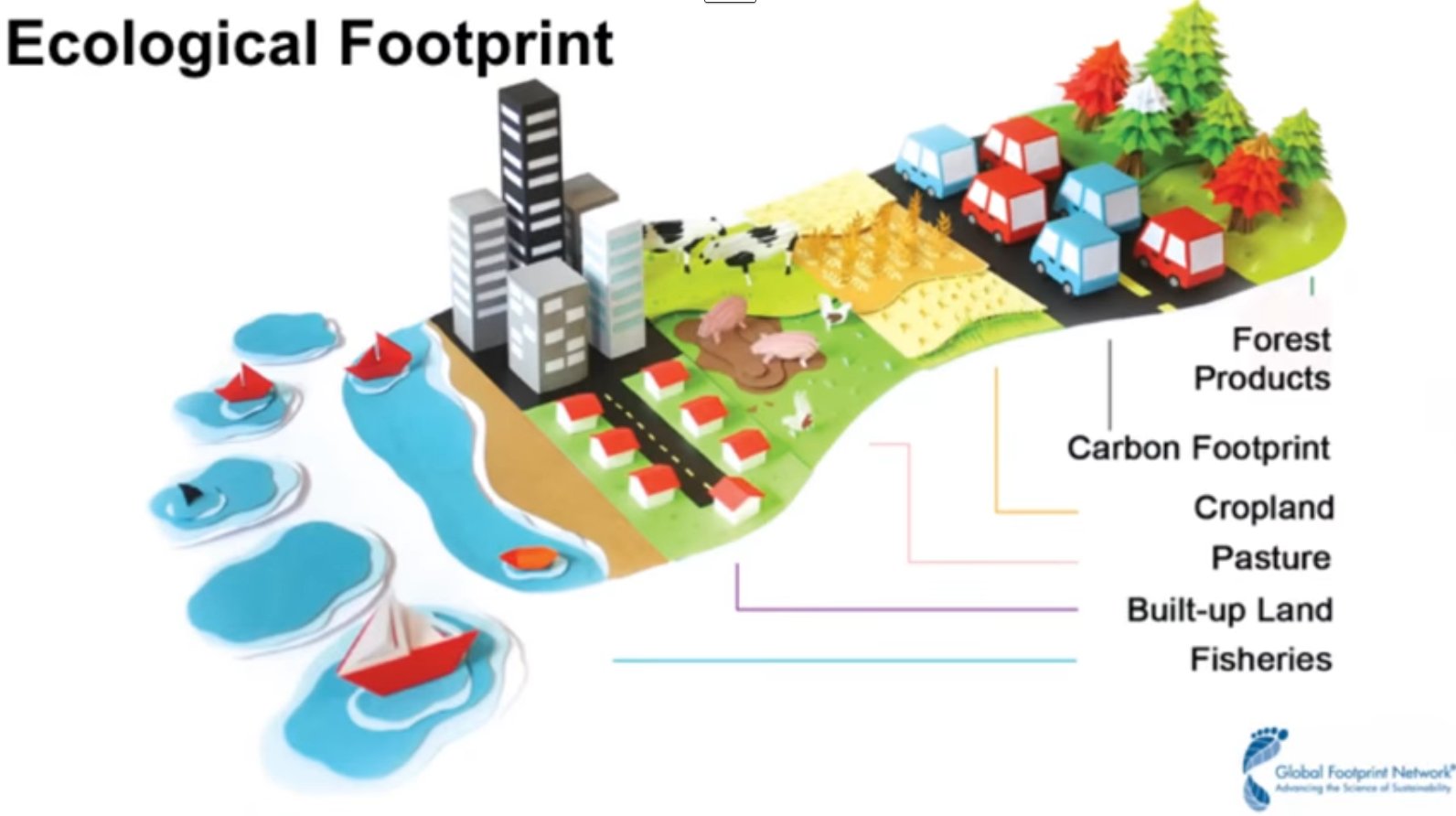
I LOVE this graphic that I found on social media a few years ago and I STILL see floating around the Twitter-sphere.  I have no idea where it came from originally, although I wish I did so I could give credit to the creator!  I did not create it and can't take credit for it, however all these years later, it's STILL extremely relevant!  


Keep in mind that technology is NEVER the b all and end all about what we do as educators in our classrooms!  Technology is simply the tool to deliver the content to the students AND for students to to create products that do those things you see on the right hand side of the graphic above!

So, Earth Day is all about raising awareness about the way that we treat our precious earth!  I wanted to share some tech and non-tech options for Earth Day activities.  Some of the things that you can do with your students are here:


  • Here are a TON of Earth Day activities found on TeacherVision:  https://www.teachervision.com/holidays/earth-day
  • Have students create their own YouTube videos (maybe using green screen) about why taking care of the earth is important.
  • Students can create their own interactive Sways  (www.sway.com) about the importance of saving our earth. 
  • What would Earth Day be without The Lorax by Dr. Seuss? I would show The Lorax to my class every year on Earth Day! We would even create Truffela Trees...YES, in HIGH SCHOOL! Here's a link to some resources and activities surrounding one of my favorite Dr. Seuss books/movies:  http://www.seussville.com/loraxproject/
  • There are some great resources on the My Garbology site that allow kids to understand which items should be recycled, composted, reused and put into a landfill:  http://www.naturebridge.org/garbology.php
  • Flipgrid is a NO BRAINER to use for Earth Day and will allow for your kids to verbalize their pledges to make the earth a better place! There are OVER 2,000 educator created topics about Earth Day waiting for you to check out!

 Flipgrid is FREE, but if you are interested in exploring the FULL classroom version FREE for 45 days, you can use the code: RACHELL to check it out!

So there you go!  A few Earth Day activities to get you going!  This is JUST the top of the iceberg!  What will you be doing with your students surrounding Earth Day?  Let us know!  


Wednesday, February 28, 2018

Adult Reading Logs!


I LOVE to read!  The truth is that I don't have a TON of time to do it!  When I was a little girl, I had a small nook in my parent's garage where I set up a makeshift library.  I put all of the books that I could get my hands on on the shelves in my little nook.  I created a handwritten list of all of the books in alphabetical order.  Whenever I would remove a book from my library, I would "check it out" to myself.  Once I was done reading it, I'd return it back to the library.  I kept track of all of these transactions on notepaper attached to a clip board.  I remember that I would stay in that little nook for hours just reading and escaping into the worlds that the books created!  

Now that I'm older and spend my "extra time" (what even is extra time???) researching, working, going to the gym (sometimes....don't judge) and attending my son's extra curricular activities, I just don't have the time to leisure read as much as I would like.  I love the idea of audio books but there is just something about physically holding a book in my hands that is therapeutic.  

I recently stumbled across a blog written by my new #edtech friend, Mari Venturino and have become reenergized to get back to my passion of reading.  Check her blog out HERE. At the beginning of the new year, I set out to read at least one book a month for a total of 12 books for the year.  I was proud of this goal, UNTIL I ready Mari's blog!  Last year she read over 50 books!!!!  Now this was a combination of audio, physical and ebooks but the point is that she made time for what she enjoys doing....reading!

So, here it is, March of 2018 and I am almost done with my first book!  Again, no judgement....I've been busy people!  Mari posted an AWESOME reading log in Google Sheets (Click HERE to get it) that she shares on her blog.  It's the COOLEST thing ever!!  It automatically creates a cute little pie chart and organizes all of your data like what genres of books you read, how many pages you've read, etc!  It's too cute!  Because I love accountability and making lists....annnnd checking boxes, this is right up my alley!  


Check out Mari's blog and her reading list.  And be sure to make a copy of her reading log!  Join me on this reading journey!  If you come across something awesome, recommend it!  I have a looooong TBR (to be read) list but I'm always looking for a good read!


Thursday, February 22, 2018

Keep on Keeping On!


Google Keep is one of my FAVORITE Google Apps in the world!  Although it's my favorite, I feel like it's one of the most under used tools located in the G Suite. Like other Google Apps, I love that I can access my Keep Notes on my laptop, desktop and my phone.  I can begin a Note on my laptop and see all of the updates in real time on my phone, etc.  It's a no brainer!  I use it for EVERYTHING!!!
  • Grocery lists
  • Blog post ideas
  • Goals
  • Things to check out
  • To do lists
  • Recipes I want to cook
  • A list of my go to vitamins
  • Appointments I need to make
  • Accomplishments
You can access Keep by going to keep.google.com.  Once you're there, you will have to log in to your Google account.  You will then have the ability to "Take a note."


Below is a quick view and description of the anatomy of a Keep Note:


  1. Give your Note a title.
  2. Start typing your Note.
  3. Pin your Note to the top of your Keep app list.
  4. Set a reminder. You can literally set a reminder that will send an alert to your phone when you pass your local grocery store on the way home from work to pick up a gallon of milk.  GENIUS!
  5. Add collaborators to your Note.  Great if you have other people that need to work on a share list/note.
  6. Change the color of the background of your Note.  Maybe you want to make all of your to do lists green, or all of your grocery lists blue, etc.
  7. Add a picture to your Note.
  8. Archive your Note.  This will remove it from your main Keep dashboard but you will still be able to access it through the Archived tab.
  9. Add a label to your Note-Great way to organize. Add a drawing to your Note.  Add checkboxes to your Note-Awesome for checking off your accomplishments!
  10. Click DONE when you're done editing your Note!
So, what else is cook about Google Keep???  You can create audio notes if you are using Keep on your mobile device. When you open a new Note, you will see a microphone that allows for this option. 

Here's an example of what Google Keep looks like on your phone and your computer.

In another post, we will dive into an awesome way to organize and bring some flavor to your Keep dashboard as well as how this tool can be utilized in the classroom!

Are you using Keep?  Do you have any best practices for this tool?